
OPEN FROM 9AM TO 5PM – CLOSED ON WEEKENDS
Choosing the right Uv Small Printers can change how a small business handles custom orders, product testing, and daily production. A compact UV printer may create sharp graphics on acrylic, wood, metal, glass, leather, and selected plastics. However, impressive sample images do not tell the whole story. Print quality depends on ink control, surface preparation, curing performance, and operator skill.
This guide examines practical options for studios, gift shops, sign makers, and growing online brands. It considers print size, resolution, color consistency, white ink performance, maintenance needs, software compatibility, and running costs. A reliable machine should fit your workspace, power supply, ventilation plan, and expected workload. It should also come with clear documentation and responsive technical support. Small details matter.
Real business experience suggests that the cheapest printer is rarely the cheapest long-term choice. Replacing clogged printheads or correcting uneven colors can consume valuable working hours. Still, premium equipment is not automatically better for every company. A beginner may need a simpler model, while a busy workshop may require faster output and stronger automation. Some advertised specifications also deserve careful review. Numbers can look attractive.
The recommendations ahead focus on evidence, usability, and realistic return on investment. They do not treat one printer as perfect. Before purchasing, request sample prints on your actual materials, confirm warranty terms, and calculate ink consumption per product. A short test can reveal more than a polished brochure. That lesson is easy to overlook. This comparison aims to help small businesses make a confident, informed, and practical decision.
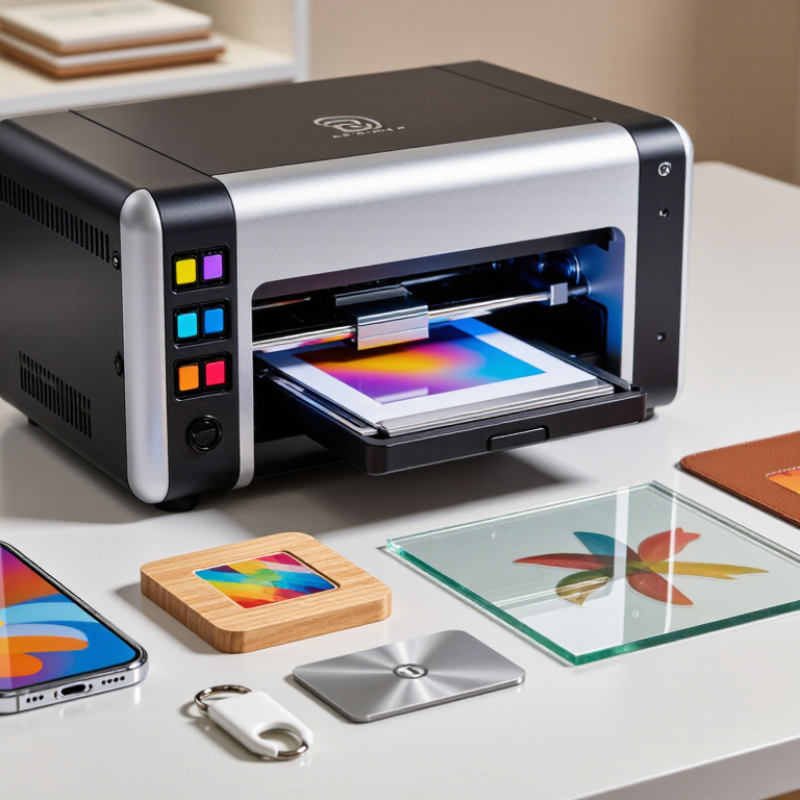
A UV small printer is a compact digital printer that uses ultraviolet light to cure ink almost immediately. Unlike traditional printers, it can print on rigid materials such as acrylic, wood, glass, metal, coated paper, and selected plastics. The printer places tiny ink droplets onto the surface. UV LEDs then harden the ink within seconds. This creates sharp text, bright colors, and a slightly raised texture.
The process is more technical than it looks. Operators usually prepare the artwork, adjust the material height, and select an ink profile. Some machines use white ink beneath colors, helping graphics stand out on dark surfaces. Others add clear varnish for gloss or textured effects. Good ventilation, routine cleaning, and correct lamp maintenance matter. Uncured ink can cause surface problems and should not be handled casually.
For a small business, the best UV small printer depends on daily volume, material size, and available workspace. A café may print short runs of branded signs, while a workshop may produce personalized phone cases or display panels. My first assumption was that compact machines were simple plug-and-play tools. That assumption was wrong. Test prints often reveal adhesion issues, color shifts, or uneven surfaces. Ask for sample testing before purchasing. Also check operating costs, printhead replacement, software support, and local safety requirements. Small footprints help, but they do not remove the need for training.
When choosing the best UV small printer for a small business, features should match daily work, not showroom claims. Print size matters immediately. A compact machine may handle phone cases, signs, labels, and small promotional items, but limited bed space can slow larger orders. Measure your products before comparing specifications.
Print quality also depends on more than advertised resolution. Look for consistent ink placement, smooth gradients, and sharp small text. White ink is valuable for dark or transparent materials. A reliable curing system helps prints resist scratches during normal handling. In my experience, easy height adjustment is often overlooked. Uneven materials can cause blurred edges or damaged printheads. That mistake is expensive.
Workflow features can protect both time and cash. Choose software with clear color controls, repeat-job settings, and useful maintenance alerts. Automatic cleaning may reduce operator errors, but it cannot replace routine inspection. Noise, ventilation needs, and power use also matter in a small workspace. Ask about service access, training, replacement parts, and realistic running costs. A low purchase price can become unattractive after frequent cleaning or wasted materials. I would test several sample surfaces before buying. One sample is not enough. Small businesses often need speed, consistency, and simple operation more than maximum technical specifications. Some machines promise flexibility, yet setup can be surprisingly demanding. That trade-off deserves honest attention.
Choosing the best UV small printer depends on how each machine handles real production pressure. Leading models usually fall into three groups: compact flatbeds, hybrid flatbed-roll systems, and entry-level desktop units. Compact flatbeds suit phone cases, plaques, and short custom orders. Hybrid systems offer more flexibility for signs, labels, and narrow rolls. Desktop units cost less, but their smaller beds can restrict profitable job sizes.
The comparison should begin with usable output, not advertised speed. A printer claiming 4–6 square meters per hour may slow considerably with white ink, varnish, or layered textures. Smithers’ Future of Digital Print to 2028 report forecasts the wider digital print market will exceed 230 billion dollars by 2028. That growth supports demand for short, customized runs. However, market growth does not guarantee a quick return. Ink consumption, curing lamps, printhead replacement, and daily maintenance can change the calculation.
Independent testing should also examine color consistency, substrate adhesion, RIP software, and operator safety features. Grand View Research reports an estimated 8.7% compound annual growth rate for the UV inkjet printer market from 2024 to 2030. That figure signals opportunity, but small businesses still need disciplined comparisons. I once focused too heavily on resolution. It was a mistake. A sharp sample cannot compensate for slow setup or frequent nozzle cleaning.
For most small shops, the strongest balance is a compact flatbed with reliable white-ink circulation, adjustable vacuum zones, and documented service support. Check the warranty carefully. Ask for sample prints on your actual materials. Costs become clearer there.
Small UV printers differ mainly by the materials they can feed, hold, and cure reliably. A compact flatbed UV printer suits rigid items, such as acrylic signs, coated wood, glass, ceramic tiles, metal cards, and thick plastic sheets. Its vacuum table helps keep flat surfaces steady. I have found that clean, lightly abraded metal often prints better than polished metal. However, adhesion can vary between batches.
A roll-to-roll UV printer handles flexible materials from a continuous roll. Typical products include vinyl labels, banners, window films, wallpaper, and synthetic fabric. It is useful for short-run decals and interior graphics. The material must move evenly beneath the printhead. Thin film can wrinkle, especially in warm rooms. That problem is easy to underestimate.
A hybrid UV printer combines a flatbed area with roll handling. It can print on rigid boards and flexible media without requiring two separate machines. Small businesses may use it for menu boards, packaging mockups, promotional panels, and custom wall graphics. Some models accept thicker objects, but advertised height limits need practical testing. A raised surface may collide with the carriage or receive uneven light. Dark materials may also need a white ink layer, while clear products can require white ink beneath and above the artwork. I recommend testing a small sample of every new substrate, checking scratches, bending, odor, and color after twenty-four hours. Some results look excellent immediately, then lose adhesion later.
Choosing the right UV printer begins with the products your business actually sells. Measure your largest item, not your average one. A printer with a 300-by-420-millimeter bed may suit signs, phone cases, and small packaging. It may fail when a customer requests a wider panel.
Check material compatibility carefully. UV printers can decorate wood, acrylic, coated metal, glass, leather, and selected plastics, but surfaces behave differently. Ask for test prints using your own materials. Examine sharp text, white ink coverage, color consistency, and adhesion after light scratching. A beautiful showroom sample proves little.
Tips: Compare total ownership costs, not only the purchase price. Include ink, printheads, cleaning fluid, replacement parts, electricity, and training. Confirm whether the machine offers adjustable height, reliable curing, and simple maintenance access. Ask for written support terms and realistic service response times. Request references from businesses with similar workloads.
Speed also needs practical measurement. A stated production rate may exclude cleaning, setup, drying checks, and rejected pieces. Track a complete job from file preparation to finished product. Noise, ventilation, and workspace temperature matter more than many buyers expect. A compact printer can still need generous clearance around its cover and moving parts. I have seen small teams choose oversized equipment because it looked more professional, then struggle with idle capacity and maintenance. The cheapest calculation is often wrong. Allow room for imperfect days.
| Printer Category | Typical Print Area | Typical Print Speed | Maximum Media Thickness | Supported Materials | Typical Ink Configuration | Approximate Purchase Range | Best Fit for a Small Business | Main Limitation |
|---|---|---|---|---|---|---|---|---|
| Compact A4 UV Flatbed | Approximately 210 × 300 mm | About 1–3 m²/hour in production mode | Approximately 50–100 mm, depending on the carriage design | Acrylic, wood, coated metal, leather, phone cases, small promotional items, and rigid plastics | CMYK; white and varnish are optional on some configurations | Approximately USD 3,000–10,000 | Personalized gifts, samples, small merchandise, and low-volume custom orders | Small working area and limited throughput for larger products or batch orders |
| Compact A3 UV Flatbed | Approximately 300 × 420 mm | About 2–5 m²/hour in production mode | Approximately 50–100 mm | Rigid boards, coated promotional products, packaging prototypes, plaques, décor, and small signage | CMYK; white ink is strongly recommended for dark or transparent materials; varnish may be available | Approximately USD 6,000–18,000 | Small print shops that need greater product flexibility and moderate daily output | Requires more workspace and maintenance than an A4 unit; speed remains limited for long runs |
| Desktop UV Roll-and-Flatbed Hybrid | Approximately 300–600 mm wide; flatbed area varies by configuration | About 3–8 m²/hour in production mode | Approximately 20–80 mm | Flexible films, labels, vinyl, coated sheets, acrylic, wood, and promotional products | CMYK plus white; varnish or light colors may be optional | Approximately USD 10,000–30,000 | Businesses producing both flexible graphics and small rigid items | More complicated media handling and higher operating costs than a basic flatbed |
| Mid-Size UV Flatbed | Approximately 600 × 900 mm to 900 × 1200 mm | About 6–15 m²/hour in production mode | Approximately 50–100 mm | Rigid signage, décor panels, packaging boards, furniture components, acrylic, glass, and coated metal | CMYK plus white; varnish and light cyan/light magenta may be available | Approximately USD 20,000–60,000 | Growing print businesses handling regular signage, décor, and short production runs | Higher space, ventilation, power, training, and service requirements |
| UV DTF Transfer Printer | Typically 300–600 mm print width | About 3–10 m²/hour, depending on white-ink coverage and curing settings | Transfers are applied to three-dimensional objects rather than printed directly on thick items | Curved or irregular objects such as bottles, cups, helmets, packaging, and promotional goods | CMYK plus white; varnish is commonly used for texture and protective effects | Approximately USD 5,000–25,000 for the printer and associated equipment | Custom labels and decorative transfers for products that are difficult to place on a flatbed | Requires film, adhesive, curing, and application steps; not ideal for every direct-printing application |
| Entry-Level UV Printer with White Ink | Approximately 200 × 300 mm to 300 × 420 mm | About 1–4 m²/hour in practical production use | Approximately 30–80 mm | Dark substrates, transparent acrylic, coated wood, promotional products, and small décor items | CMYK plus white; varnish is usually optional or unavailable | Approximately USD 4,000–15,000 | Businesses that need opaque graphics, layered effects, and occasional white-ink printing | White ink requires regular circulation and nozzle maintenance to reduce settling and clogging |

